Week 1: Hearing sounds
Top start off with the sound assignment, we were taken to different places around University and listen to the sounds with our eyes closed. Then we write down on our phones what we heard. I've copied the sounds here.
Canteen
-
Ventilation
-
Girly giggles
-
Gossip
-
Footsteps
-
Chairs dragging
-
Metal trolleys moving
-
Opening plastic container
-
Alarm
-
Lights and fridge buzzing
-
Package shuffling
-
Cutlery
Silent Library
-
Typing
-
Breathing
-
Suffling of clothes
-
Whispering
-
Creaky footsteps
-
Buzzing lights
Corrider near Cafe and Bar
-
Coffee machine throthing milk
-
Ventilation
-
Electric buzzing
-
Music
-
Squeaky and shutting doors
-
Footsteps
-
Shuffling coats (But that might be me)
-
Talking
-
Banging
-
Beeping
Entrance
-
Talking
-
Ventilation
-
Beeping
-
Opening gates
-
Automatic doors
-
Distant cars
-
Footsteps
-
Keys jingling
This is to help me practice for finding hidden sounds when I'm in the environment for the assignments. Finding the smallest of things can help me make my assignment sound more dynamic.
Week 1: Assignment progress
For our assignment, we are meant to make a map in Unreal or Unity using the program Fmod to implement sounds and have some interactable moments where sounds are played. For this assingment, I've chosen an asset that I've picked up for free at some point in the Unreal Market. This is a monthly occurance where there's free assets given away for a limited time, and that was one of them.

Week 2: Hearing sounds again
We were given another task during lessons, and that was to listen to the sounds during a boss fight with Gym Leader Raihan in Pokemon Sword and Shield We are then to breakdown the events and how audio is affected in the game and how other audio plays out. I've never played Pokemon games religiously, so I might butcher some descriptions.
The video is shown below. (Ignore the bikini pfp)
This is what I've written in lessons:
A beep when moving onto the next dialogue - Sadly, no audible talking
Crowd cheering - Getting louder when Pokemon are summoned - Other crowd cheers before the game begins - Chanting/Sing-a-long when Pokemon become giant
Footsteps for running and walking - unsure if it's intentional, but the boss' footsteps are louder than the girl's feet
The sandstorm doesn't sound that noticable when brought into the fight.
Music fades out when leveling up - Triumphant trumpets play when leveling up
Now I'll try to expand on and clean this up a bit:
The game makes a beep whenever you progress the character's dialogue and similar sounds are played when moving in the menus. This is to confirm that your buttons are responding, and a lot of games do that.
The crowd tends to be at a mid to low level when cheering, and start to raise their voices whenever something happens like a new Pokemon is summoned, a move becomes super effective, or cheering when the player and Raihan walk to their fighting positions, knowing that the battle is starting. When Raihan is preparing for his large Pokemon, the crowd begins to chant or sing-a-long with the music being played quietly, almost replacing it.
A minor thing I've noticed at the start was how the player's footsteps were quiet compared to the Raihan's footsteps. I try to connect this to the boss being more of a threat whenever he walks, but I might be stretching it a bit.
I guess what I meant to say about the sandstorm is that you can hear it when it's summoned at first, but the sound of the storm doesn't persist throught the level. It doesn't feel like the storm is a threat or presence, and is more an illusion or an excuse to blur the stadium for stability sake.
The music does change throught the game when certain tasks are done. At first, the music doesn't play when you talk to Raihan, but it starts when the game also starts. What you may have noticed is that the music also changes whenever you've defeated Raihan's Pokemon and has a more victorious tone to it, letting you know that you're a step closer to winning. The song also muffles whenever you're in the menu, as your attention draws away from the stadium and lets you calmly choose your items and Pokemon. The only time the music does mute itself is when your pokemon level up and a trumpet jingle is played. Then, the music quiets down as the audience join in with the pre-mentioned chants and sing-a-longs, blending together with the music to match the situation of 2 large pokemon fighting eachother.
Week 2: Assignment progress
Not much to say on this week's side of the Assignment. I have been made aware of a field microphone in Uni, so I might give it a try.
Week 3: Visual Impairment
As a random group, we've been tasked with having to create a brief design document or a description of a game that can be played by those with visual impairment.
Me and the team decided to make a game where you play as a hunter in a dense field trying to hunt down a wild boar that runs around and tries to kill you. I don't have the document on me, so I'll try to write down a good description of what I've thought of.
The Map
The map is a simple square where the player can hear 4 objects to determine what direction he's in. A creaky windmill on the West, a crow on the East, the wind in the North and either silence or a river to the South. The distance of the sounds will also change, with the sounds getting louder the closer the player moves to the location whilst further sounds are lowered. The map will also trap the player in a wooden fence that when walked into will create a thunk which lets them know they're running into a wall. There will be some paths on the map that'll let you know if you're in or outside the field when making different footstep sounds.

The AI
The wild boar will be inside the dense fields and not in the open, so the player has to search where the boar is. Faster and lighter footsteps are heard with snorts, letting you know where the boar is and being different to the player's heavier and slower footsteps. You can hear it from any direction and you have to face where you think the boar is hiding. The boar will then charge at the player to damage them. To attack the boar, wait for a shrieking squal and press the attack button to stab it with your weapon. Miss your attack and you will be damaged. The boar will run away and the player would have to wander the map to find the boar again.
Player/Enemy Health
Both the player and the Boar will have 3 health and it will be shown through sounds. The player will hear nothing with 3 health, a faint heartbeat at 2 health, a heartbeat and heavy breathing at 1 health and then muffled sounds, followed by silence when at 0 health. This is to help identify how severe the situation is for the player and let them know how close they are to a game over. For the boar, the same system is implemented, with snorts at 3 health, snorts and short squeaks at 2 health, painful wailing at 1 health and then the boar makes no noise when it dies. The sounds are to help tell how far the player is at winning the game.
Other notes
-
The player will obviously hear the impact of their weapon when using it. When they thrust the weapon at something, it'll make a sound of hitting the ground, grass/wheat, fence or the air.
-
The camera only moves left and right, and not up and down since there's no need to stab the sky.
-
Obviously, the game will have no UI since the whole point is to play this without looking at the game. The best case scenario.
-
A narrator will be there to help with explaining the rules of the game and its controls, list out the features and also be used to help navigate the menu by saying what option the player is on and how to change to the next option.
Week 3: Assignment progress
I went out to supermarkets to record some sounds for a common thing you find in shops; fridges. I'll be putting the field mic inside the fridges for a ew seconds. I can't show pictures of the places cos A, I don't have them and B, I'm not the kind of person to take pics in public places. Sorry, I'm just like that.
As for the assets in Unreal, I've adjusted the jumping for the character and added barriers to places that would prevent the player from getting stuck or having to add sounds to walking on shopping carts (I'm not going to jump on a shopping cart). I've also cleaned up some areas, made intentional messes and opened some doors that were locked to the player.
Week 4: Going through my assets
So, I've went through the map and I've listed all the locations and the possible sounds I can get from each room or area. Additionally, I've included what can be an interactable part of the game.
Outside
-
Road Footsteps
-
Wet Puddles
-
Bushes
-
Buzzing lights
-
Wind
Supermarket indoors
-
Tile footsteps
-
Music and announcer voice
-
Steppable stands
-
Closed/Open Fridges
-
Buzzing lights
-
Glass displays
-
Squeaking doors
Bathrooms
-
Tile/Carpet floor footsteps
-
Dripping water
-
Flushing toilets
-
Ventilation
-
Pipes
Storage
-
Echoey Tile footsteps
-
Wooden pallets
-
Electric Shutters
Interactable parts
-
Opening doors
- Opening shutters
There isn't much to work with since this is an abandonned supermarket, so I will compensate with some extra details to adding footsteps on places that you wouldn't normally walk on and try to invent new places to stand on. I'll also use the Level Sequence mechanics to animate segments of the Supermarket and make them interactable by the player using Triggerboxes.
Week 5: FMod (For the Assignment)
This one lesson was set in Halloween and it wasn't a good one. I sadly was unable to attend the lesson due to chest pains and I was sent to an ambulance to be checked up and go home. So, didn't do anything for the lesson.
So I guess I'll just spend this section on talking about everything I've done on FMod for the assignment.

This is my event for the announcer and music speakers if there are any. I thought of programming to play a random track for the announcer, but I wasn't the best at figuring it out myself.
From an Unreal perspective, FMod is a plugin software where you can import and edit sound effects to be primarily used in Unreal. There are plenty of unique features that gives the developer more options to edit their audio without having to redo anything in Audacity or Abobe Auditon, and it's a lot more flexible than regular sound actors in Unreal.
To the left, you create sound events and they can be 2D or 3D, depending on how you make it. I also seperate the events into folders and give them appropriate names so I don't forget what's what.
Next, I drag and drop my audio to an audio track, and above the track, create a loop in the Logic Track which allows me to loop the audio in Unreal. I then adjust the volume slightly and that's how it is for most sound effects.

3D Events usually have this inside the Master Track, and that is a Spacializer. It allows me to control the volume of how far the player is from the sound. There's more effects that can be added and I'll go through an example of what I use.

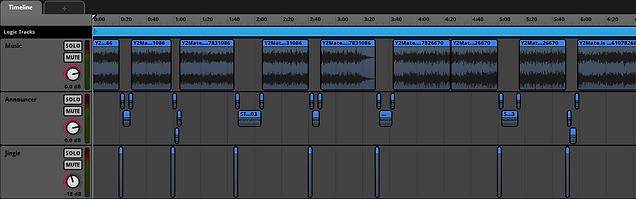
Effects can be added to each track or all of them on the Master track. The example on the right is a reverb effect and I use it for the speaker event to make it dampen the quality of the music and to make the sound echo like real supermarket speakers. When creating my Effect, I rotate the dials around until I get the desired effect.

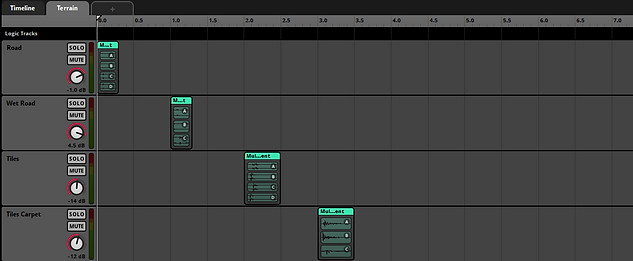
When importing multiple sounds at once into a track, you get them inside a Multi Instrument, which also comes with a randomizer that's perfect for having randomized footstep sounds. That's why I'm using it for the right event, along with a new Paramater called Terrain. Custom Paramaters allow me to limit how long my event will be, like this one being 9 seconds for a special occasion later.
When you press Ctrl + 2 on FMod, you get this menu to pop up and this is the Mixer tab. In the future, I would want to customize my volumes whenever I'm in-game and entering different rooms. That is why I'm using the Mixer tab for this purpose. The first thing I do is seperate the sounds into groups: Outdoor sounds, Indoor sounds and SFX sounds, which the 3rd one will be left alone since it'll be played both inside and outside. I've also created 2 Snapshot Events early on which is the important part of the assignment later. By default, the player will be outside, so I've silence the Inside group slightly so you can still hear it thought the walls.

In the Snapshot section, I can add 2 Snapshots with different volumes for the Inside and Outside groups. Inside will quiet down outside noise and makes inside voices loud, whilst Outside does vice versa. You can see the results by playing the snapshots with the sound you want to listen to simultaneously.

With the Snapshots made, I've made 2 events that'll act as switches for the Snapshots. Each one will have an audio track that plays it and one that mutes it. I do this by dragging and dropping the Snapshots from the Mixer to the event and then changing the intensity on the bottom dial to the right one.

When looking into Unreal, I'll probably be going back to explain and show examples from FMod again. Here, I'll leave a video of me playing all the sounds that I've used in FMod.
Note: The music one does drag on and I used it as an exuse to go eat something while it's recording. Accidently pressed space when came back, so I just skipped to what I said in the voice clips.
The rest of my Assignment
For the final section, I'll be going through Unreal, all the sounds I've made raw and credit some sounds I didn't make below. It's going to be a long one. But first, Maya.
Maya Model

This one's short and to the point, but the Supermarket didn't have any speakers anywhere, so I've made some Loudspeakers of my own in Autodesk Maya to have a visual of where the sound is coming from, and not be a background audio like the outdoors one.
I've made the speakers out of pimitive squares and cylinders, and extruded them to the point where it resembled what I wanteed from it. I also beveled the corners slightly so it looks smoother. Next, I've applied some simple lambert materials to blend in with the blandness of the Supermarket. I then imported it as an OBJ file and did the usual drag and drop into Unreal, along with the Fmod actor.
My (and other's) Sounds
I have made most of the sounds for this project, a lot of it with varying quality and success. Here is a video going through the audio.
In addition, here's a list of the scrapped audio and why they're scrapped:
-
Bush V1 - Mic popping and Road noises
-
Bush V2 - Wind and Road noises
-
Outdoor Ambiance - Doesn't sound like a desert and Road noises (Notice a pattern?)
-
Bathroom Vent - No such thing in the bathrooms
Of course, a lot of the sounds I couldn't do was due to requiring too many factors to make clean audio, having to inconvenience people over sound effects or borderline impossible to do (Like finding a desert in the UK) Also, I needed music so I mamanged to get some from a reliable individual...
All the links to the sounds can be found below:
Buzzing Light: https://freesound.org/people/InspectorJ/sounds/415873/
Announcer Begin: https://freesound.org/people/dbfan/sounds/631445/
Outside Desert: https://freesound.org/people/felix.blume/sounds/651241/
Background Music: https://www.youtube.com/watch?v=PPKmTO43IGA
https://www.youtube.com/watch?v=vYrAi5kv-CY
Door Shutters: https://www.youtube.com/watch?v=AG9LH8MdtIs&ab_channel=SoundEffectDatabase
Door Squeaks: https://freesound.org/people/InspectorJ/sounds/337450/
Unreal Scenes Breakdown
For each image, I'll show a screenshot of a part of the map and detail actors and trigger boxes.

1
2
3
4
5
-
A trigger box that triggers the snapshot from Outside to Inside and vice versa when interacted with again.
-
A trigger box that triggers the level sequence that opens the doors and plays 3 sounds: 2 squeaks and the sound of the door scraping on the carpet.
-
Carpet trigger box that gives the player carpet footprints.
-
3 thin Tile trigger boxes that changes the player footprints to tiles.

-
A loud buzzing is placed on all 4 of the lampposts. It plays on a loop.
-
8 puddles have been given 8 trigger boxes for the puddle footsteps. If the player walks out, it switches back to road footsteps.
-
A 2D outdoor sound is played. I don't think there's any need for it to be 3D, so It'll play when the player is outside.
-
A similar buzzing noise is now on the neon sign of the supermarket, but it more louder and deeper.
-
Similar trigger boxes to the puddles are placed on the bushed and the player can run on them with leafy footsteps.

1
2
3
4
The fridges are a simple one: I just put the sounds in the right places like underneath the fridge where it's usually the ventilation and on the open parts of the fridge.


The fruit stands are low enough for the player to jump on, so I thought of adding the same trigger box to them and add fruit squishing sounds.
1
2
-
A very subtle sound effect is placed in both bathrooms as you can hear the drops of water dropping from the faucet.
-
Yet another similar trigger box is placed where the player's footsteps change to a carpet when you walk on it. It ends and goes back to tiles when you walk out.
-
These are 2 trigger boxes on both sides that change the sound effects from normal tiles to echoey tiles depending on what direction the player runs into.
-
Another Level Sequence triggerbox but with only 1 sound effect this time, and that's the squeaky doors with a slight echo.
-
Wooden pallets are used to add another footstep sound effect. Originally, there would be empty spaces on the food stands, but I just chose to fill it up instead. So this is a subsititute for the wood sounds.
-
A trigger box for the 3rd and final event where the player opens electric shutters with a loud shattering noise that goes with it.
-
A trigger box that acts the same as the one in the front where when walked over, the snapshot changes to the opposite depending on what the player was on previously.

1
2
3
4
5
Now onto the nodes, it's going to be meaty...
Before I start with any node placements, I go to my character animations. Here, there are notifies which allow me to add these notifications to a keyframe. I can add and name these, and also move them around and duplicate them. Right now, I'll be using 2 types: Footsteps and Squeak.

In the animation blueprints, I've set up a node for when the player walks and the Notifys are triggered, a sound taken from FMod plays in response. The squeak sound does just that on its own but when it comes to having multiple footsteps, I need to have more than just play this sound.
If you recall earlier in FMod, I've made a new paramater for the footstep event where I limit the seconds to 9 and had all of my footstep sounds split into individual seconds. This is needed to work with this special system. I set the paramater to which footstep sound is to be played to the player, with a terrain variable that determins the perimiter value. Trigger boxes around the game will change that terrain number, therefore changing what sounds the footsteps are playing.
This stomp sound when landing a jump sadly doesn't work for me.

Moving to the level editor, this is what I have set up. By default, I set the terrain variable to 0, this will play the road footsteps when the character is running. Then, I set the environment boolean to True by not having it ticked. (I might get the combination wrong later, but we'll see)

This is the most common nodes you'll see. I create a begin or end overlap for the trigger boxes and then I cast them to the player, with the GetPlayerCharacter node connected to the Cast. Then, I can set the Terrain variable to whatever number I want. This variable also controls which sound effect is played for the footsteps and changing that number changes the sounds.


I don't want to show all of the nodes, cos I'll be here all day, but here is what all of the trigger box nodes look like. Some only have them triggering on touch, and others have commands when leaving the boxes.
The GetPlayerController connects to all the cast nodes in the area and and multiple connect to 1 casts, which is good since I don't need to make multiple casts and have to make the GetPlayerController node look more like blue spaghetti.
This seciton is quicte quick to get out the way, but this function is what plays the level sequences when the player touches the trigger boxes. It also plays the FMod sound to that prop which I manually made dormant until it's activated. To get the sound to play, I dragged the sound actor to the blueprint and got the Add FMod Audio Component node. It is however uniquue to it's own sounds, so I can't copy and paste the same nodes.
Originally, I've tried to program a way to close the doors. When you walk away, they close on their own and make the same sounds. However, I wasn't able to get a way to cut the sounds off when the animations continue to play. I tried a lot of attempts, but no luck. So I made the decision to destroy the trigger box when activated once to avoid replaying the same animations and breaking immersion.

These nodes are something special: They are responsible for the Snapshots for the Inside/Outside sound effects. Because of how massive these types of codes are, I've chosen to incase them inside of Macros. Simply put, Macros are condensed versions of big blocks of nodes into a single node. It's to keep things cleaner and easier to navigate.
I'll go through the front door Macro since it's the same thing as the backroom macro anyways

This will be confusing to follow, but basically whenever the player will interact with the trigger box, it will go whichever way depending on the Environment boolean for True, the footsteps are set to 0 before starting, whilst False plays the InsideSnap event and sets it as the default; this is when the player enters the supermarket, the inside sounds get louder whilst the outdoor sounds have gone quiet.

Vice versa happens on the True section with also an Event Instance Stop node stopping the previous snap preventing both snaps from being mixed up. Same thing is done for false. I had text say when my character is inside or outside, but I've muted them for a cleaner recording. Finally, the boolean is then set to False in the True section and True on the False section to repeat the process whenever the player collides with the trigger box.

All these nodes and bits and bobs of sounds and trigger boxed culminate into this video showcasing the map and environment that I've created.