This portfolio will cover 2 parts of my time in Experimental Games: one being written documents and analysis of other games and the other is a weekly blog for the development of my game and what has been done in the process.
Experimental Game Analysis
We've been given a task to analyse an experimental game with one of the 4 points being Aesthetics, Gameplay, Story and Technology. You only needed to pick 1 for the week, but I chose to cover the first 3. I'm going to post the whole document here for you to read:

The game that I’ll be going through is called Papers Please, an Indie Point-n-Click where you play as an Inspector in a booth going through citizen and immigrant papers, passports and other information. Then determine if you either let them into the country or find errors in the documentation to deny or detain them.
Aesthetics
The game’s presentation in the colours and textures is drab, bland and cold. The art goes for the simplistic pixelated art with limited details to the props and world, and the colours are not vibrant or offer much of a contrast, unless the colours are the exact opposite of the other props. This is to reflect the more grim time period of an Eastern-European country after the war between the 2 fictional countries. It’s reflective of a time period like the 1930s Great Depression or what a Communist country looked like at the time. The only colours that are considered vibrant are the stamps used on passports, but the ink that they leave on them have the same colour palette, and not as vibrant as the stamps themselves.
Gameplay
The gameplay involves dragging and dropping papers on the table and finding errors by connecting them together with the discrepancy detector. If none of the papers have problems, then they’re free to go. If there’s a problem, you report it and either debunk the issue, deny or detain the individual in question. On most days, the rules change and new events unfold to the player. They go from denying immigrants to having to use tickets, then documents, work permits, and so on and so forth. The monotonous task of stamping peoples passports seems novel and it would be tricky to drag the gameplay for over a dozen days, but it’s the inclusion of new rules and papers that switch up the gameplay and keeps it fresh.
What also keeps things getting interesting is the player getting thrown into dangerous scenarios such as an attack that needs to be dealt with a tranquiliser gun or at one point, a bomb that needs to be defused by yourself. On a lighter note, there are side stories and secondary characters that break the monotony. Something as simple as finding criminals or requesting to let special people in with the risk of a citation, with the reward of a collectible or money. These one-off side stories are also a break from the grim parts of the story, such as Jorji being the comical relief or letting in a love interest as requested by the guard. It’s bonus content like this that livens up the game and has you pay attention to other things happening in the story.
Story
The story is set in the fictional country of Arstotzka after the 6 year war against another fictional country, Kolechia. The borders reopen for all immigrants, Kolechia and the rest of the fictional countries to enter, as long as they’ve got the right papers.
As mentioned before, you play as the Inspector and you view the world, people and events through the comfort of your booth. Major stories are mostly covered in the newspapers you read before going to work. But you do end up taking part in the story by meeting characters that drag you into doing work for them, or something irrelevant for the purpose of character development or making extra money for your family. Whether it's helping the Ezic assassinate targets or by letting in exceptions out of pity or requested by other characters. And there’s some balance of comedy and positive drama that helps keep this game from becoming miserable beyond redemption.
This perspective isn’t covered a lot since it’s not as grand as a soldier in a war, a politician in the middle of a tense treaty or even a starving civilian (which your character kind of is). Your character is in the perspective of someone of a higher authority that looks down on the citizens, visitors and soon-to-be immigrants. One small mistake can change the outcomes and can throw someone into prison or deny entry. It’s an interesting way of putting the player in the perspective of not the citizen, but someone who watches over the private information of those who enter their country to see if they’re worth it.
The Concept Pitch
Another individual task that involved writing documents was the pitch for what our own experimental game would be. It would be a short pitch that goes through the basics in 2 pages. I'll post a link to the PDF below.
To summarise what my game idea was, it was a cashier simulator in which you drag and drop money to give customers change. The orignial title at first was "Quick Counting"

The First GD Document
Before I get to this, I have made the decision to do the project individually and use the Week 4 pitch as a starting point to my idea.
This is the first draft of the Vision or Games Design Document that I have written. It's the first draft so a lot of the sentences are messy and there's not well thought-out. I will share an updated version of the GDD later.
On a side note, the name was changed twice. First, it was changed to "From Copper to Paper" which had a rhyme-y tone, but then settled with a simle "Cash Register Simulator" title as suggested by a couple people.
The Teaser
This teaser was made to show off the short gameplay of the game and to get future players somewhat excited about the game when it's released.
Now obviously, this one's not going to go public, but it's to show what would it look like if it was ever made into a real thing.
The recording was done using a built-in capture tool for Xbox Game Bar, the FMV render was made in Autodesk Maya and everything was assembled in Adobe Premiere Pro.
Credits:
Music
Sounds
Final Gameplay Footage
For the final first half, I'm going to share the final gameplay footage of the prototype I've worked on. It's pretty straightforward, just showing the game in question.
Additionally, here is the updated GDD with the changes labeled in red.
Second Half: The Weekly progress
This half covers the weekly logs of what I've been up to at the time, what has been changed and the progress in the tasks.
Proper development started on Week 6, while the previous weeks have been pre-planning and document work.
Week 6: Beginning
After some brainstorming about how I would make draggable money with physics, reinventing a puzzle template into a cash system, I decided to make it so that you drag coins from blocks and drop them into a flat surface to count the number up.
I've went with making this game in the puzzle template for the fixed camera and use some assets that might help me out with this. I've cleaned up a lot of the items that don't help me at all.
The order sheet is a 3D widget that will be coded later, the green mat is a plane and there's a box that will be the substitute for the cash register crank. The tray was roughly made in Autodesk Maya and the invisible blocks that'll create the coins are places inside the holes.
The pencil is so far the only store asset I'll include in the game and the original model can be found here.
In the scripting side, I've made a very basic mouse events script that allows the player to interact with the objects using the mouse. A print script will show what cube is assigned to what coin.
At the same time, I've prepared a spreadsheet that goes over each item in-game individually and price them in 2 catagories: Easy and Hard.
Finally, I was told by the teacher that I was meant to have the Unreal project on 4.26, not 4.27 and porting it to an older version wasn't possib;e. I am now unable to share the work on campus to the teacher for feedback, and now it
lead to me sharing screenshots and word of mouth.


Week 8: Already in a pickle


Things haven't been going smoothly with the idea of making 3D blocks into coin spawners. The idea fell apart and on that week, I decided to take a few templates from well-made Youtube videos to make a drag-n-drop template for the coins, and a Timer for the level. The timer script is mostly done in the Shopping list itself and the Drag-n-Drop template is much of the same, except the values have changed to Money and Name.
On the side, I've made a Level Sequence and a button that activates it. The button moves the money tray and its contents forward to the middle portion of the screen and it stays there forever. The money boxes in question stay there and only give off the print script on the corner.
In addition, I've implemented the first sound effect for the game over screen. This one is a metal pipe sound that's been commonly used by the Youtuber Jixaw. Sadly, I couldn't track the very original version from where he got the sound from, but here is the video I've taken the sound from. Also, the idea for the Dark Souls screen was my teacher's idea. It was done in Photoshop. That's all.
Lastly, I've decided to integrate Datatables to the project by having all the info from the spreadsheet placed into 2 Datatables separated by difficulty. I've also made a script that prints out the datatable values to 3 scrollbars on the widget. My end-goal with this is that I wanted to make a randomized shopping list that picks out random rows from the Datatables, but that might need some more work.


Week 10-11: Submission
Week 10 was the submission of the prototype of the game, but it was extended to week 11 due to a group trip to London. For that, I compiled both of the weekly works together.
The money system was redone fully and I've got a video below showing off how the game plays now.
After I've done all parts of the Drag-n-Drop script, I edited a widget that spawns on the screen for the player to drag onto white squares. At the time, I wasn't able to add the money to the number widget below, but the only thing that mattered was if the money is in the square. And it was.
A lot of simple scripts were made for the buttons so that the tray also closes when activated. There haven't been any new sounds or models added and the project, but it was all about getting the script cleaned up and sorted.
However, I was suggested to spawn the widget another way. To have it in the level as a 3D widget, just like the Customer Orders. But for now, I moved onto something else.
Week 12: Asset Creation and Trailer
As a side activity, we were told to make a 15 second or more teaser for the game and I've decided to make an FMV-like title end for the trailer. This was done by animating the new props I've made in Autodesk Maya, them being the Cash Register, coins and the bell.
The addtional animations was an idea of having more of these scenes like a zoom-in on the bell, a spinnign coin and a now lost clip of stacks of coins being added and substracted rapidly (This one was lost in a crash that I couldn't recover from). These extra clips weren't rendered due to needing more gameplay clips than Maya-Rendered ones. I've went back on the trailer and updated it with more recent clips from the finished product. I thought it looked better.
Materials and models from Maya have been ported to Unreal and were reanimated in the Level Sequence. The coins were left out and have been repurposed as static models attatched to the money tray.


Week 13: 2 Steps forward, 10 Steps left
At the time, I have been having issues with figuring out how to make a 3D widget work, but it was mostly due to schedules and panic over the task that made me forget how easy it was to make the 3D widget. I would spawn it with a normal script that spawn the widget as an actor and in a specific size, rotation and position.
The bell has been given a blueprint in which the bell would ring if the money total is equal to the correct answer (E.G: If the answser is £2.30 and the float variable is 2.3, then it's correct when clicking the bell) It creates a screen telling the player that they won. Again, it's like Dark Souls. Also done in Photoshop, with the old one updated. Moving on.
Visually, everything's updated with the blocks replaced with actual models and new sound effects for the cash register, coins and bell. The clapping for when the player wins was done by me and my family clapping on my phone's microphone.
Unfortunately, I'm stuck with a single piece of code that's hindering my progress. What I'm trying to do is have a visual number of money in the widget, and I've even set the text box in a function. But nothing shown up. I've done 2 versions of the code where it's done in an actor widget, like the Timer template and a small one where the Drag_To white box widget blueprint is (The latter was the right one).
There's a lot of bits and bobs that don't work, but I'll keep trying.
Also, here's a video showing what the game looks like rn.


Week 15: Speedrun to the Finish line
I was stuck to the point that there was no progress for Week 14. I sent the work to my teacher and we've worked on the script for the Drag_To widget. Nothing came up so I left him to find a solution. An hour later, he resent the project back to me and the issue was the variables were in a bad place, so he created a new actor with an instance variable that was then useable in the Drag_To script and the Bell script. With that minor fix, I finally got a winnable level.
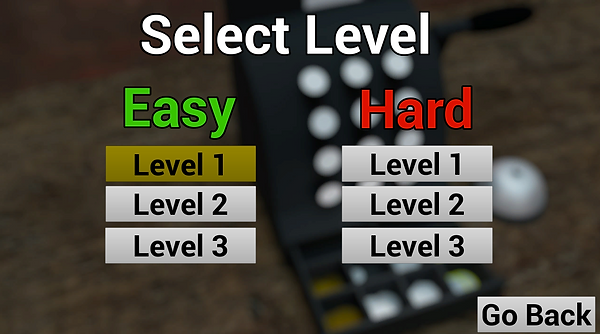
The level was completed, so I've quickly updated everything and made sure it was clean. Then, I've copy and pasted the level with duplicating the Customer's Order widgetand the Bell blueprint. Each level has their own shopping list and bell with different edits for answers and visual tweaks and this has been done to 5 new maps. These maps being 2 new easy ones and 3 hard ones. Obviously, the Datatable RNG idea never worked so I've skipped it for fixed levels. I've updated the new menu so that the levels can be selected.
A lot of the levels are different and are more than giving money that's slightly over the number. Things like giving 20 pounds for a single lemon or a bag of hundreds of brown coins.
Other changes included the removal of the 9 white boxes, leaving only 1. This is cos all the boxes acted the same and there wasn't a limit to how much money is put in the box anyways. Icons for the notes were updated so it doesn't show stretched numbers.
And that's where the game's finished.

Conclusion
To conclude this module, I would say that for a solo project, I pulled it off decently with a working artifact that includes a few levels. I was worried that I didn't have creative freedom with my work and would have troubles getting a motivated group to get things done, but then I've learned a lesson that there's a reason why group works are a thing.
One critique would be that my overall knowledge on scripting wasn't high, and I've again been pushed into a roadblock that for me took weeks to figure out, actually takes 2 hours or even less to solve. It didn't help the fact that I also messed up on making my game on the most recent version of Unreal when Uni computers weren't allowed to have that version. It hindered the way I was able to share my work with the teacher with limited information and at worse, guessing the problems. In the near future, I should consider these hiccups the next time I'm considering program versions.
But again, I'm pleased with the work I've made something from scratch with the help of a couple templates and guidance to the right direction. I'll end this here since I'm going to repeat myself. It was a messy production, but a better one to end on.